Bee Shrimp Aquarium Getting Started Guide
Install, set expectations, and build your first calm aquarium view in one session.
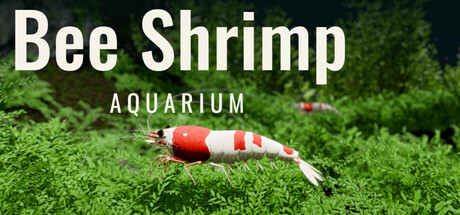
Bee Shrimp Aquarium is a single-player 3D observation game by TRANAZ, released on Steam on November 20, 2026 (App ID 5472200). The loop is simple on purpose: choose a preset aquascape, frame the camera, optionally feed or ripple the water, and watch bee shrimp graze, walk, swim, and groom. This guide gets you from install to a comfortable first-hour setup without treating the game like a management sim it is not.
List price is $4.99, with a launch promo around $4.24. A demo is available on Steam if you want to test performance and the observation feel before buying. Supported interface languages include English, French, German, Spanish, Brazilian Portuguese, Russian, Simplified Chinese, Traditional Chinese, Japanese, and Korean. Streaming and video posting are allowed without prior permission, including monetized content.
What this game is — and is not
You will watch bee shrimp pick at moss and leaves with tiny claws (often described as つまつま / picking moss), then walk, swim, and groom. Plants sway, light shifts, and water sound can sit quietly in the background. You customize shrimp count, pattern, color, and size; you pick lighting; you can auto-rotate the camera or auto-cycle favorites.
You will not breed shrimp, manage ammonia or pH, or freely place plants and rocks. Those systems are intentionally absent. If you arrived looking for a full aquarist sandbox, read this page once, then decide whether the observation focus still fits. For a short fact sheet, keep the Wiki page handy.
Install and first launch checklist
- Confirm system requirements: Windows 11 64-bit, Intel Core i5-8400 class CPU, 8 GB RAM, NVIDIA GeForce GTX 1660 6 GB, about 5 GB storage.
- Install the full game or the demo from Steam, then launch once to verify shaders and audio.
- Open the in-game options and set water sound volume to a level that stays pleasant for long sessions. See Best Settings for comfort presets.
- Pick any aquascape from the twelve presets — moss and driftwood is a gentle first choice — then switch lighting between bright, sunset, and moonlight to see how plants and water change.
- Adjust shrimp count within the aquascape maximum, then try one pattern, one color, and one size so you learn the menus before fine-tuning. Details live in Customization.
- Practice rotate, pan, and zoom until you can frame a close-up of grazing without fighting the camera. Full notes: Controls & Camera.
- Feed once and click the water surface once so you see gather and ripple reactions. Then pause animation if you want a still frame. Full notes: Feeding & Interaction.
- Save mental favorites: one aquascape, one lighting mode, one viewpoint. Later, enable auto cycle with an interval that fits studying or streaming.
Your first calm desktop view
A good default for homework or light streaming is medium framing on a moss-forward aquascape under sunset or moonlight, with moderate shrimp count and water sound low enough to sit under music or voice chat. Enable automatic camera rotation if you want slow motion without touching the mouse. If you prefer variety, mark a few aquascapes and lighting modes as favorites and let auto cycle shuffle them. Scene-by-scene notes are in the Aquascapes Guide; opinionated picks are on Aquascape Rankings and Lighting Rankings.
Trailer and visual expectations
The trailer below shows the observation focus: close shrimp motion, aquascape variety, and lighting changes. Watch it once after install so your expectations match what the product delivers. Then return to this wiki when you want structured how-tos instead of store-page marketing.
After the first hour
Explore the rest of the Guides Hub in any order. Most players bounce between camera framing and aquascape hopping. When you care about “best” scenes for ambience, open the Tier List Hub. Track patches on Updates and Launch Notes. For community habits and streaming etiquette notes, see Players. If promo codes ever appear, they will be listed on Codes.
Developer updates and chatter may also appear on X/Twitter via @kengo700; treat store page and in-game text as the source of truth for features. This wiki stays aligned with the observation-only design: twelve aquascapes, three lighting modes, shrimp cosmetics, camera tools, feed, ripples, and pause — nothing more invented for filler.
Common early mistakes
- Expecting breeding or water tests — they are not in the game.
- Maxing shrimp count on every aquascape before learning camera framing — start mid-range so individuals stay readable.
- Leaving water sound loud under voice chat — dial it in options early.
- Ignoring moonlight — it is often the calmest long-session lighting; compare modes on Lighting Rankings.
- Skipping auto cycle — it is the feature that turns the game into a hands-off desktop aquarium.
Finish this guide, then open Controls & Camera while the game is running so you can practice each input as you read. When framing feels natural, move on to feeding and customization. You only need one comfortable loop to get the full value of Bee Shrimp Aquarium.
Frequently Asked Questions
Quick answers to the most common questions.
When did Bee Shrimp Aquarium release and what does it cost?
It released on Steam on November 20, 2026. List price is $4.99, with a launch promo around $4.24. A demo is also available.
Can I breed shrimp or manage water quality?
No. The game has no breeding, no water quality management, and no free plant or rock placement. It is an observation experience with preset aquascapes.
What should I do in my first session?
Verify performance, pick an aquascape, try all three lighting modes, practice camera framing, feed once, create a ripple, then enable auto rotation or auto cycle for a calm desktop view.
Is streaming allowed?
Yes. Individuals and companies may stream, post videos, and share screenshots without prior permission, including monetized streams.
Where do I go after Getting Started?
Read Controls & Camera, then Feeding & Interaction, Customization, and the Aquascapes Guide. Use the Guides Hub as your index.